UTM parameters — recognise visits from a QR code in your analytics
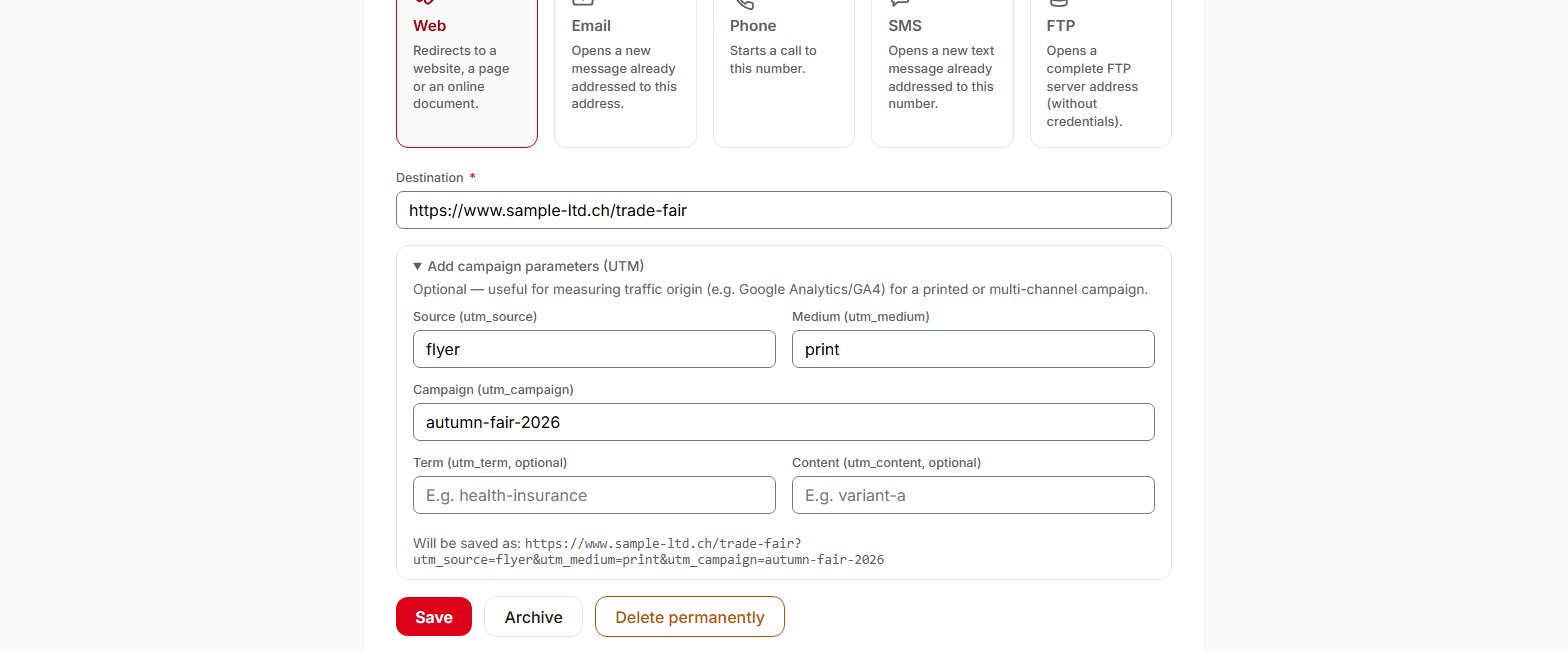
An optional assistant adds campaign parameters (UTM) to a Web link, so that your website's analytics tool recognises visits coming from your printed materials.
Plans: Free · Pro · Entreprise
UTM parameters are pieces of information added to the destination address (source, medium, campaign, and optionally term and content). Your website's analytics tool, for example Google Analytics 4, reads them to attribute a visit to a campaign. In QR Suisse, the “Add campaign parameters (UTM)” section of a Web QR code's form adds them for you and shows the full address before you save. Like the destination, they can be changed at any time, without reprinting the material. UTM parameters are available on all plans, including the Free plan, for Web links.
Frequently asked questions
What is a UTM parameter?
utm_source=flyer. It does not change the page displayed, but it lets your website's analytics tool know where the visit comes from. The five standard parameters are source, medium, campaign, term and content.How do I add UTM parameters to a QR code?
Can I change the parameters after printing?
Why does the number of scans differ from the number of visits in Google Analytics?
Does QR Suisse use the UTM parameters?
Help pages
See also
Try QR Suisse
The Free plan is available immediately, self-service, no credit card required.
Create a free account